How to Mark Attendance in Attendance Management 925worksuite ERP
Overview
This guide explains how to mark attendance for employees in the HR system. It allows administrators or authorized users to record staff attendance for a specific day.
Steps
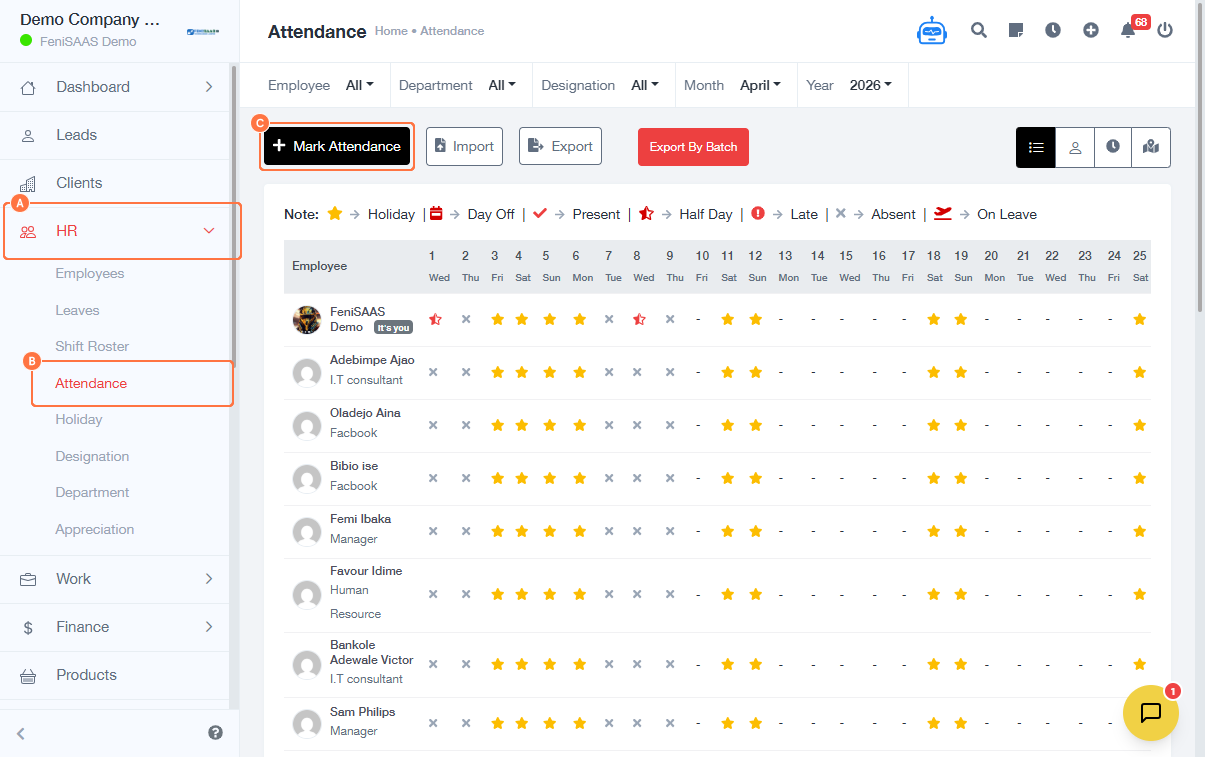
- Go to the Dashboard
- Click on HR
- Select Attendance
- Click on Mark Attendance
- Select the appropriate date (if required)
- Mark attendance for employees (e.g., Present, Absent, etc.)
- Click Save or Submit to record attendance
Expected Result
Employee attendance will be successfully recorded and available for reporting and tracking.
Common Errors
- Attendance not saved because the Save/Submit button was not clicked
- Incorrect date selected when marking attendance
- Not marking all employees before submitting
- Permission restrictions preventing access to attendance module
FAQs
1. How do I mark staff attendance?
Go to HR → Attendance → Mark Attendance and record attendance for each employee.
2. Can I mark attendance for past dates?
This depends on system permissions and settings.
3. Why can’t I access the attendance module?
You may not have the required permissions. Contact your administrator.
4. Can I edit attendance after submitting?
Yes, if the system allows editing based on your access level.
5. What happens after marking attendance?
The data is saved and can be used for reports, payroll, and performance tracking.