How to Apply For Leave in Leave in 925worksuite ERP 0 0
Overview
This guide explains how to assign leave to employees in the HR system. It allows administrators or HR personnel to create and assign leave records, including duration and reason for absence.
Steps
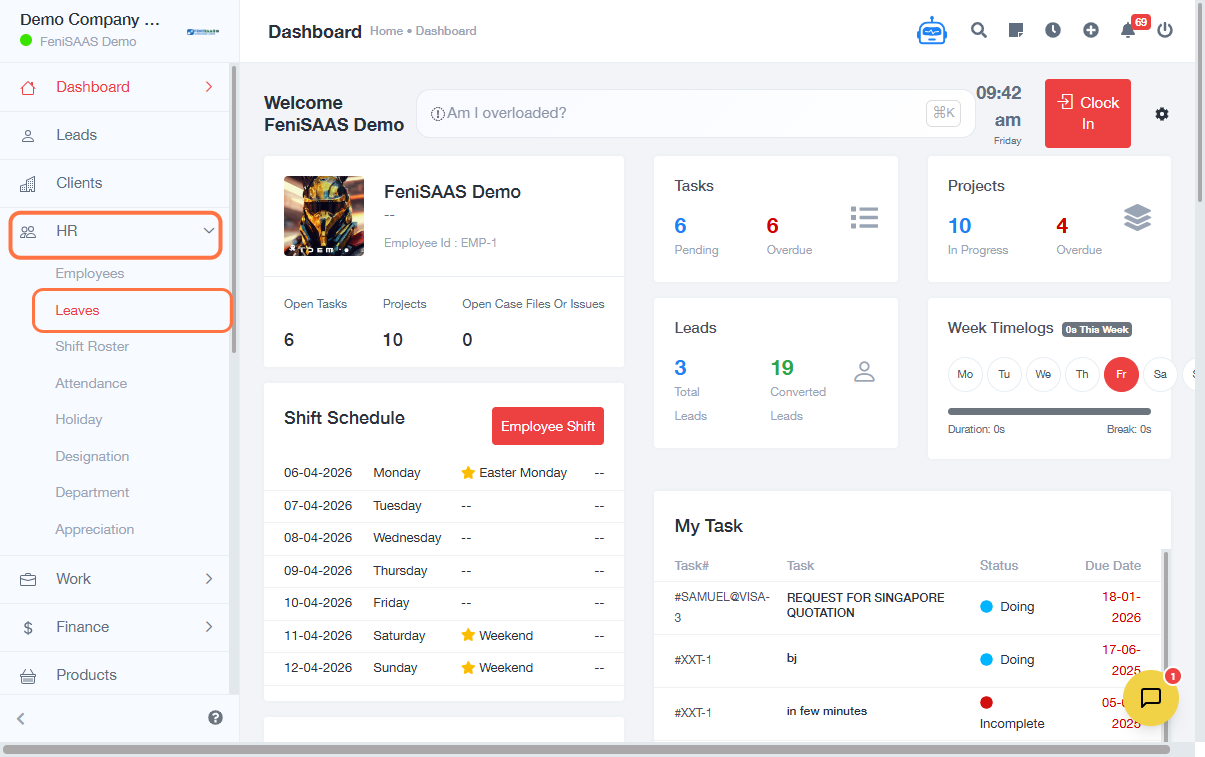
- Go to the Dashboard
- Click on HR
- Select Leaves
- Click on New Leave
- Select Assign Leave
- Choose the Employee you want to assign leave to
- Select the Leave Type
- Set the Duration (start date and end date)
- Enter the Reason for absence
- Click Save
Expected Result
The leave will be successfully assigned to the selected employee and recorded in the leave management system.
Common Errors
- Leave was not saved because the Save button was not clicked
- Required fields (employee, duration, or reason) not filled
- Incorrect date selection for leave duration
- Assigning leave to the wrong employee
- Insufficient permissions to assign leave
FAQs
1. How do I assign leave to an employee?
Go to HR → Leaves → New Leave → Assign Leave, then fill in the required details and save.
2. Can I assign leave for future dates?
Yes, you can select any future date when assigning leave.
3. What happens after assigning leave?
The leave record is saved and reflected in the employee’s leave history.
4. Can I edit or cancel assigned leave?
Yes, depending on your permissions, you can modify or delete the leave record.
5. Is a leave assignment the same as a leave request?
No, assigning leave is done by HR/admin, while employees typically initiate leave requests.