How to Track Employee Attendance in 925worksuite ERP
Overview
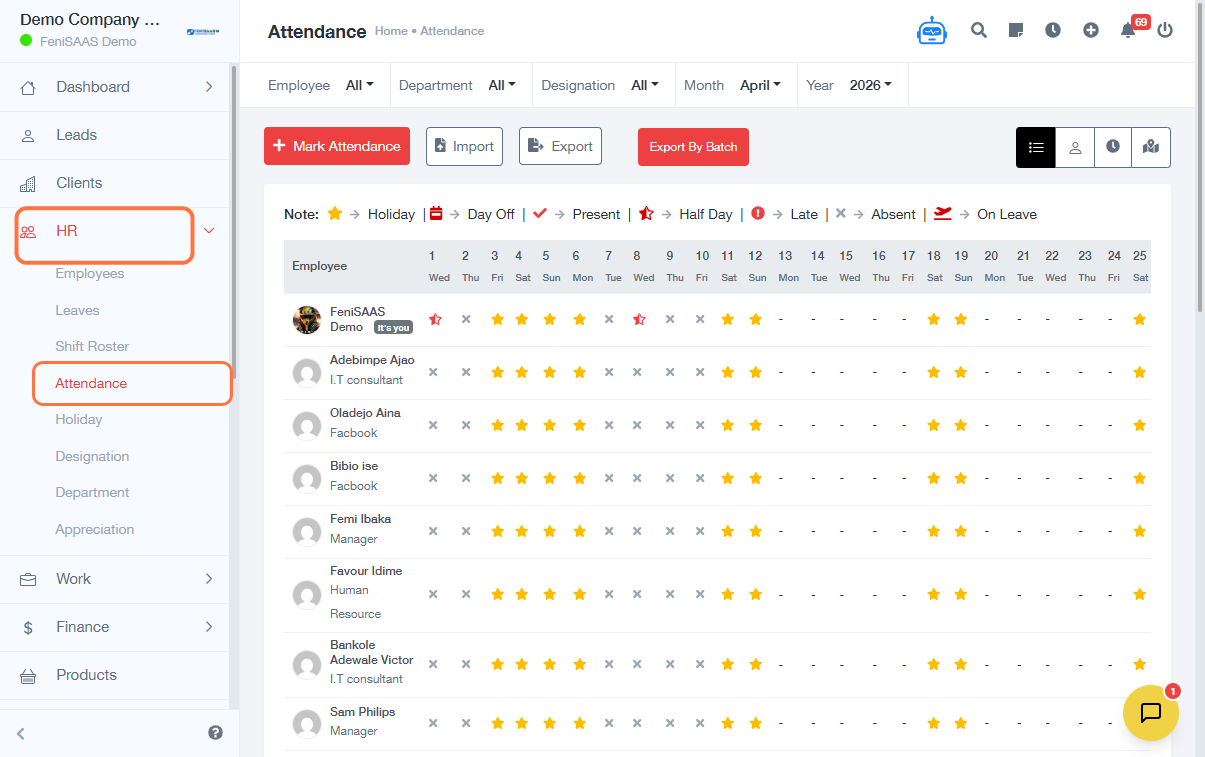
This guide explains how administrators and managers can verify employee attendance in the system. It provides insights into staff attendance records, including hours worked, lateness, and location tracking.
Steps
- Go to the HR
- Click on Attendance
- Select the Employee
-
Choose how you want to view attendance:
- Attendance by Member (view individual staff records)
- Attendance by Hour (track time logged)
- Attendance by Location (see where staff clocked in from)
- Select a specific Employee/Member to view details
-
Review attendance insights such as:
- Hours Logged
- Late Attendance
Expected Result
You will be able to view and verify employee attendance records, including working hours, lateness, and location of clock-ins.
Common Errors
- Not selecting the correct employee
- Clicking the wrong attendance view (member, hour, or location)
- Misinterpreting attendance data (e.g., hours vs lateness)
- Not selecting a specific employee for a detailed view
- Insufficient permissions to access attendance records
FAQs
1. How do I check staff attendance?
Go to HR → Select Attendance → Choose view type → see employee attendance.
2. Can I see where employees clocked in from?
Yes, use the Attendance by Location option.
3. How do I check late staff?
Open an employee record and click on Late Attendance.
4. Can I track total hours worked?
Yes, use the Attendance by Hour or Hours Logged section.
5. Who can verify attendance?
Only users with admin or HR permissions can access attendance records.