How to Create and Save Estimates in 925worksuite ERP
Overview
This guide explains how to create and save an estimate in the Estimates module. It covers entering estimate details, adding products or services, and saving the estimate for client review or future conversion.
Steps
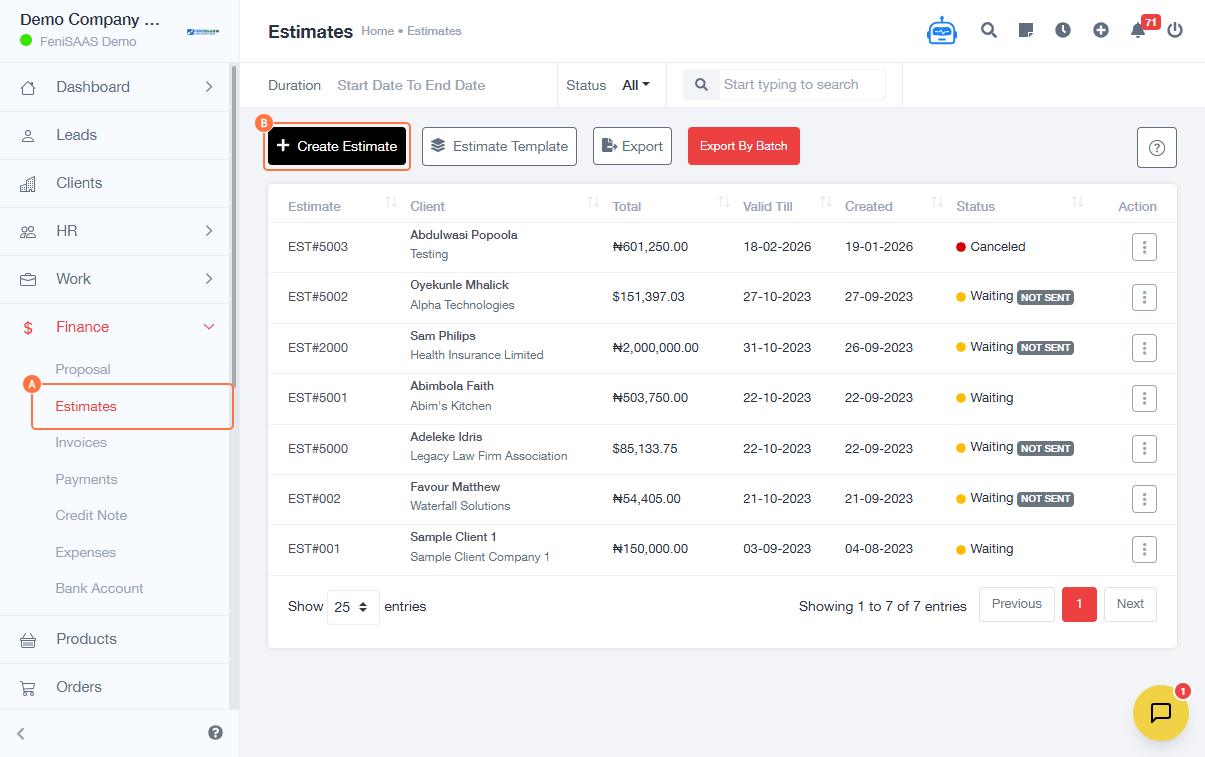
- Go to Finance
- Click on Estimates
- Click on Create Estimate
-
Enter estimate details:
- Input Estimate Number
- Set Valid Till (expiry date)
- Select Currency (NGN ₦)
- Fill required fields (client)
- Enter Description
-
Add items:
- Click Select Product
- Enter Description
- Input Unit Price
- Enter Quantity
-
Add additional notes:
- Enter Note for Recipient (optional)
-
Save estimate:
- Click Save
Expected Result
The estimate will be successfully created and saved, ready to be viewed, edited, sent, or converted into an invoice.
Common Errors
- Missing estimate number
- No product or service added
- Invalid or past expiry date
- Incorrect pricing or quantity values
- Not saving before exiting
FAQs
1. Can I edit an estimate after saving?
Yes, estimates can be edited before being finalized or converted.
2. Is adding a product mandatory?
Yes, at least one item must be included in the estimate.
3. What does “Valid Till” mean?
It defines how long the estimate remains valid for the client.
4. Can I convert an estimate into an invoice?
Yes, estimates can typically be converted into invoices.
5. Where can I find saved estimates?
All estimates are available in the Estimates section.