How to Add Payment in 925worksuite ERP
Overview
This guide explains how to add and record a payment in the Finance Payments module. It covers entering payment details, selecting accounts, attaching receipts, and saving the transaction.
Steps
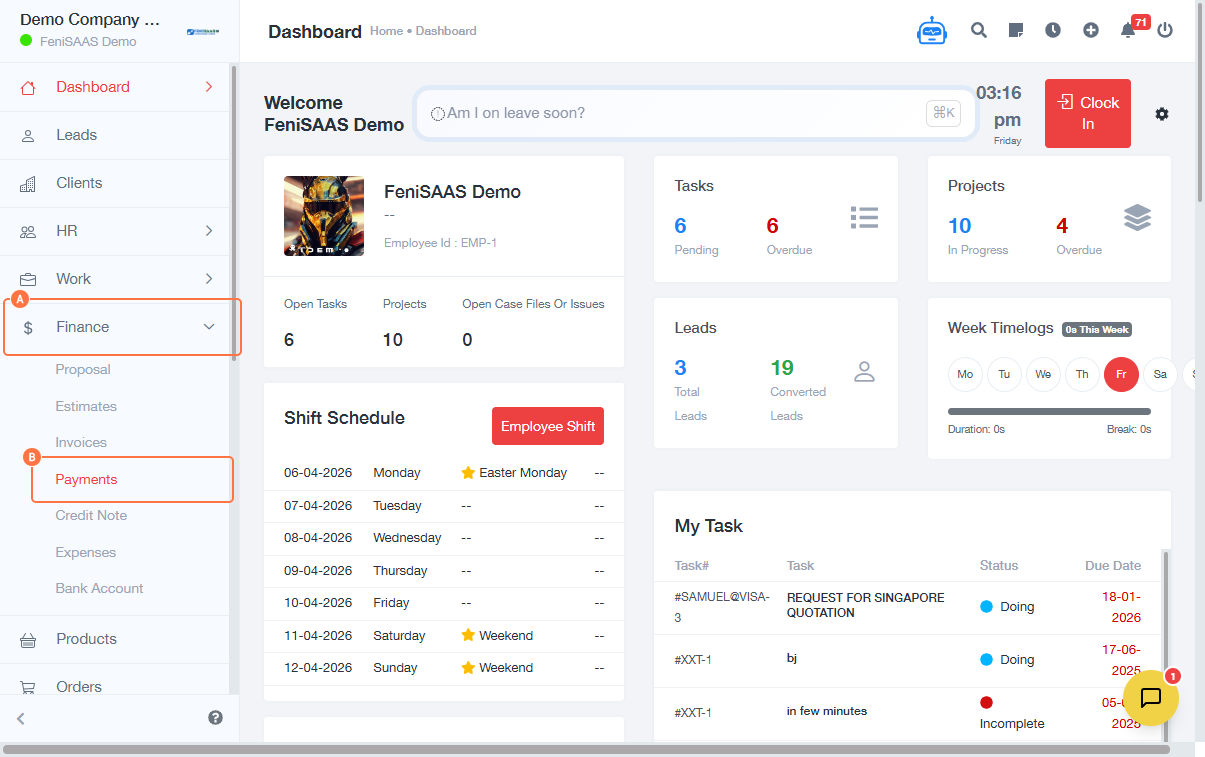
- Go to Dashboard
- Click on Finance
- Click on Payments
-
Add payment:
- Click on Add Payment
-
Enter payment details:
- Fill in Payment Details (e.g., payer or reference fields)
- Select required fields
-
Input transaction information:
- Select Paid On (date)
- Enter Amount
- Input Exchange Rate (if applicable)
-
Configure payment options:
- Select appropriate fields (e.g., payment method or account)
-
Attach receipt (optional):
- Upload or select Receipt
-
Add remark:
- Enter Remark (optional notes for the transaction)
- Save payment:
- Click on Save
Expected Result
The payment will be successfully recorded in the system and reflected in financial records and reports.
Common Errors
- Missing required payment details
- Incorrect payment amount
- Invalid or missing date
- The exchange rate was not entered when required
- Failure to attach receipt (if mandatory)
- Not saving before exiting
FAQs
1. Can I add payments without linking to an invoice?
Yes, payments can be recorded independently depending on the system setup.
2. Is attaching a receipt mandatory?
No, but it is recommended for record-keeping and audit purposes.
3. What is the exchange rate field for?
It is used when recording payments in a different currency.
4. Can I edit a payment after saving?
Yes, depending on permissions, payments can be updated or corrected.
5. Where can I find saved payments?
All payments are available in the Payments section under Finance.