Add Bank Account in 925worksuite ERP
Overview
This guide explains how to add a new bank account in the Finance module. This allows you to manage transactions, track balances, and link financial activities to a specific bank account.
Steps
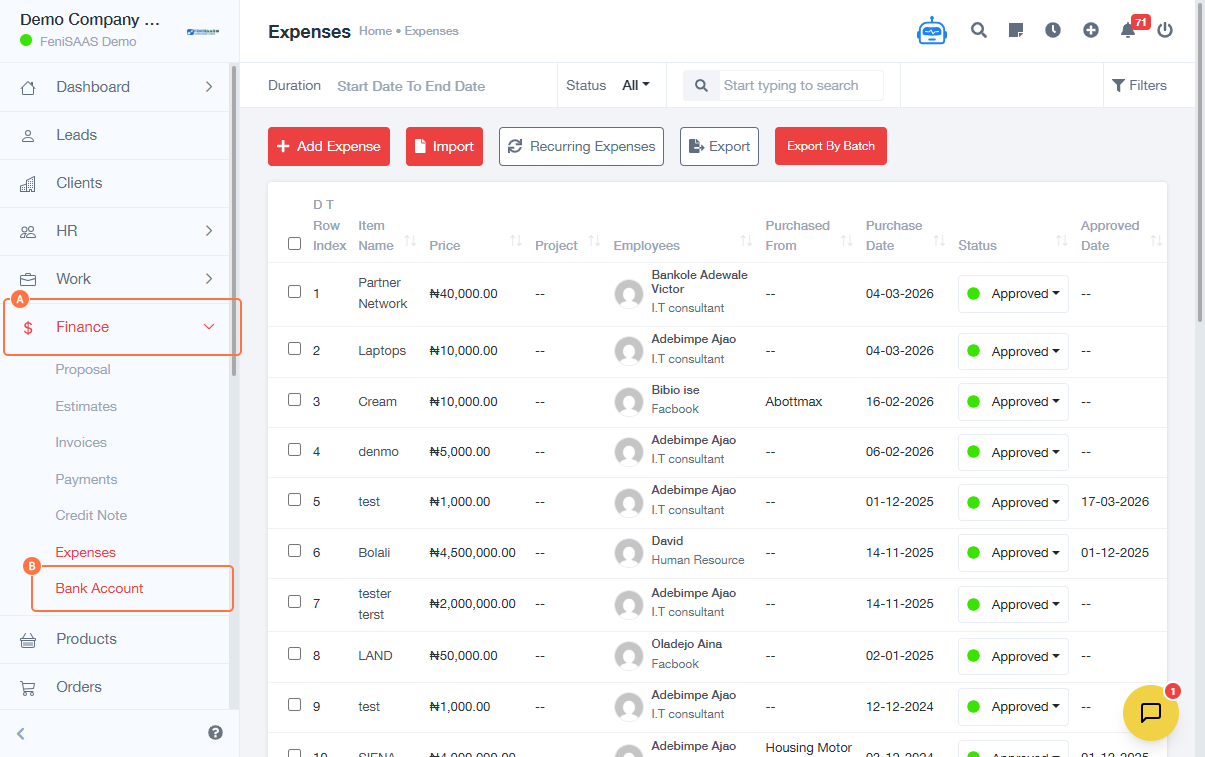
- Go to the Finance Module
- Click on Bank Account
-
Fill in the required account details:
- Select Account Type (e.g., Savings or Current)
- Enter Bank Name
- Enter Account Holder Name
- Enter Account Number
- Select Currency (e.g., NGN ₦)
-
Enter additional details:
- Input Contact Number
- Enter Opening Balance
- (Optional) Add any additional relevant information if required
- Click Save
Expected Result
The bank account will be successfully created and available for use in financial transactions within the system.
Common Errors
- Missing required fields (e.g., account number or bank name)
- Incorrect account number format
- Wrong currency selection
- Leaving mandatory fields empty
FAQs
1. Can I add multiple bank accounts?
Yes, you can create and manage multiple bank accounts within the Finance module.
2. What account type should I select?
Choose the appropriate type (Savings or Current) based on your actual bank account.
3. Can I edit the bank account after creating it?
Yes, bank account details can be updated later if needed.
4. What is opening balance used for?
It represents the starting balance of the account for accurate financial tracking.