Knowledge Article
How to Start New Chat in Chat9Fi 925worksuite ERP
0
0
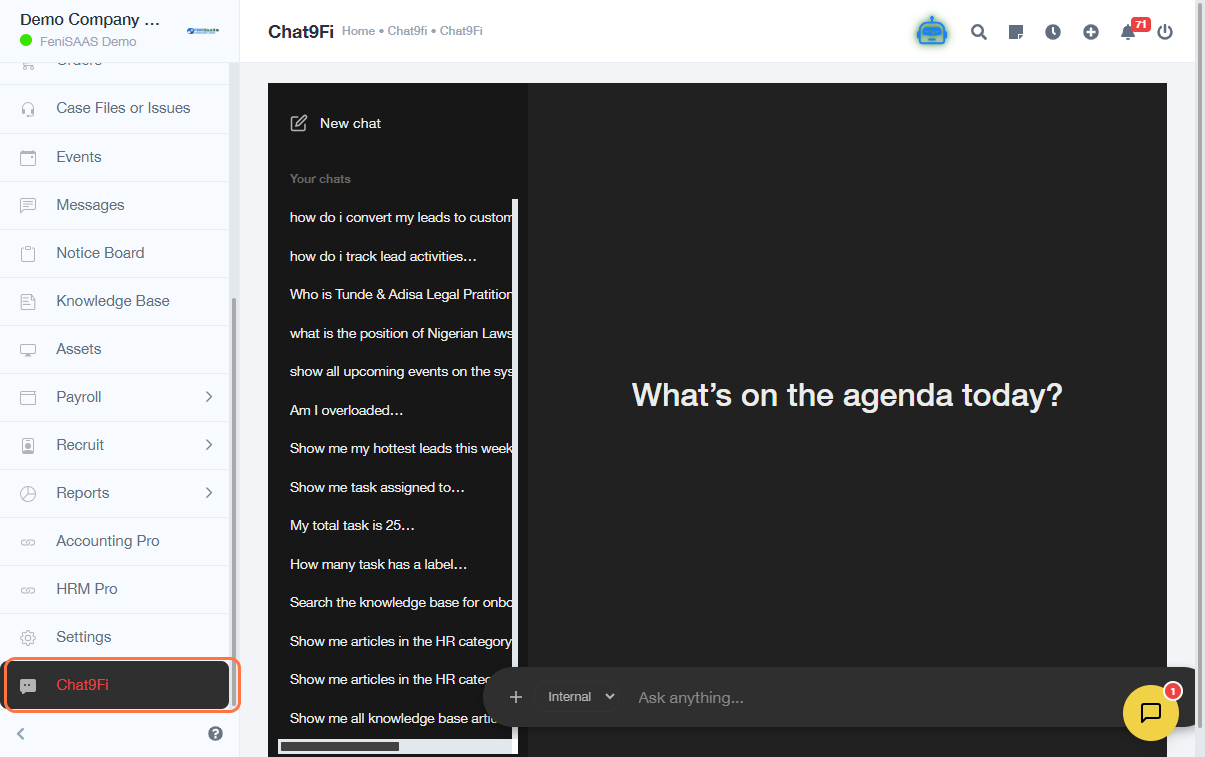
Overview
This guide explains how to start a new chat in Chat9Fi. This allows users to initiate fresh conversations for queries, tasks, or interactions within or outside the system.
Steps
- Go to Chat9Fi
- Select an option to allow the system to know where to pull resources from
- Click on the " Ask anything… input field
- Click on Your chats (optional – to view previous chats)
- Click on New Chat
Expected Result
A new chat session will be created, allowing you to start a fresh conversation.
Common Errors
- Not clicking New Chat before typing
- Confusion between existing chats and new chat
- Page not loading properly due to network issues
- Clicking inside the old chat instead of creating a new one
FAQs
1. How do I start a new chat in Chat9Fi?
Go to Chat9Fi and click on New Chat.
2. Can I continue an old chat instead?
Yes, select from “Your chats” to continue previous conversations.
3. Why can’t I see the New Chat button?
Ensure the page is fully loaded or check your permissions.
4. Do I need to select an option before chatting?
Yes, to help the system know where to pull resources from.
5. Can I have multiple chats at once?
Yes, multiple chat sessions can exist simultaneously.