How to Sign In to Accounting Pro
Overview
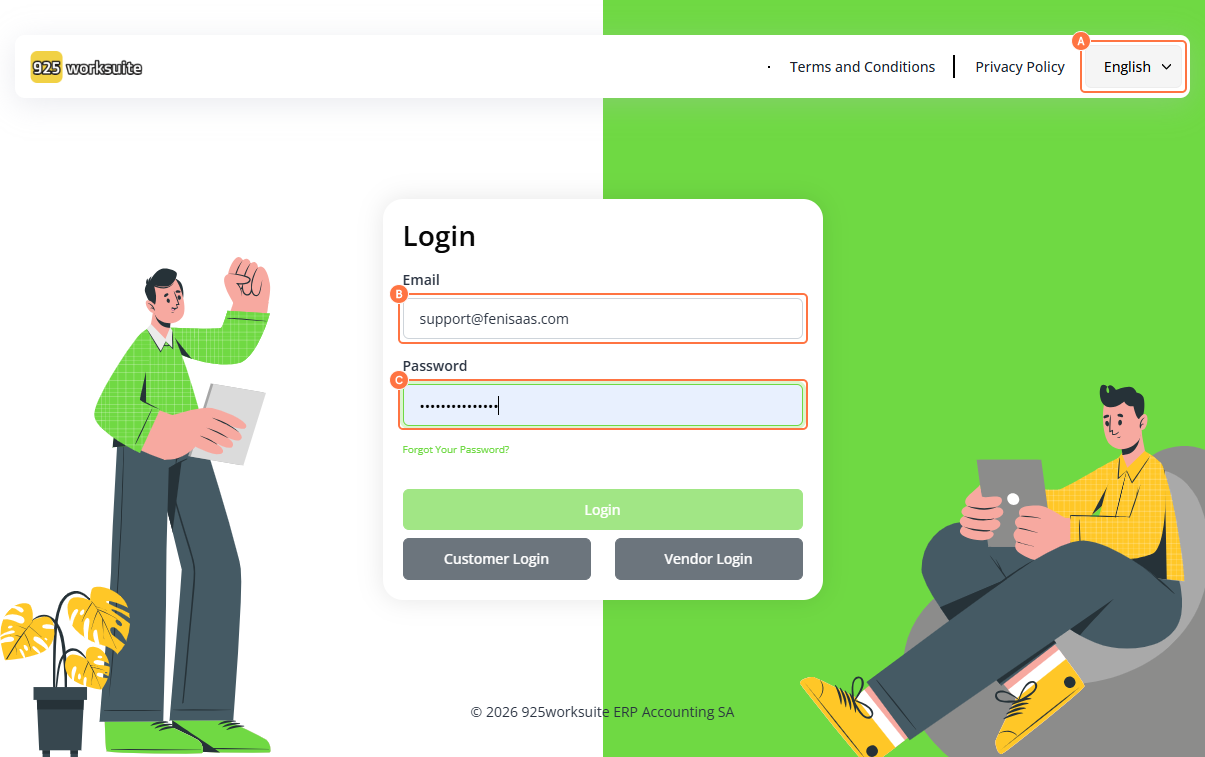
This guide explains how to sign in to the 925Worksuite Accounting SA platform. Users can access their accounting dashboard by entering valid login credentials.
Steps
- Go to the Accounting SA Login Page
- Select preferred Language (e.g., English)
- Enter your Email Address
- Enter your Password
- Click on Sign In
Expected Result
You will be successfully logged into the Accounting SA dashboard and gain access to your accounting features.
Common Errors
- Incorrect email or password
- Leaving required fields empty
- Caps Lock is enabled when entering the password
- Network or page loading issues
- Account not yet created or activated
FAQs
1. How do I log in to Accounting SA?
Enter your email and password on the login page and click Sign In.
2. What should I do if I forgot my password?
Use the “Forgot Password” option on the login page.
3. Can I change the language before logging in?
Yes, select your preferred language before entering credentials.
4. Why can’t I sign in?
Check your login details or ensure your account is active.
5. Do I need an account to sign in?
Yes, you must have a registered account.