Task Management In the 925wprksuite ERP
Overview
This guide explains how to create and manage a new task in the Tasks module within the Work section. It covers setting task details such as title, category, dates, description, and priority to ensure proper task management and tracking.
Steps
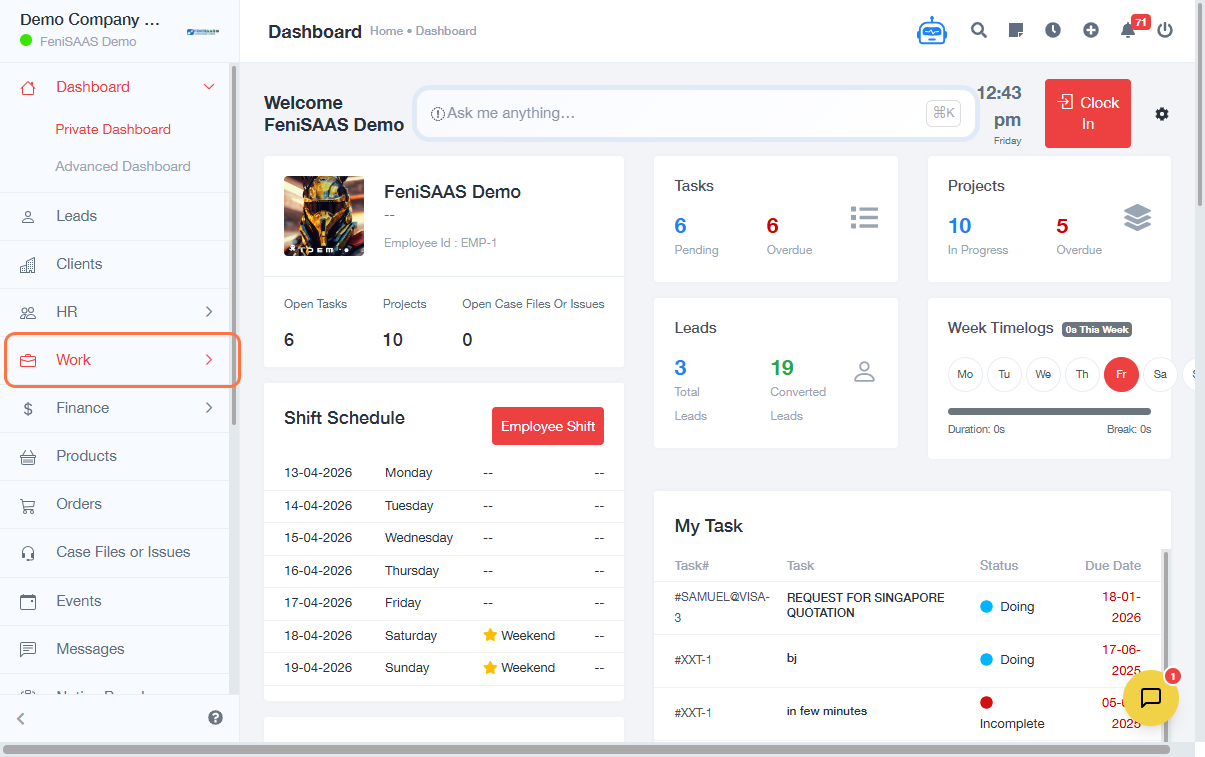
- Go to the Dashboard
- Click on Work
- Select Tasks
- Click on Add Task
- Enter Task Details:
- Input Task Title
- Select or create a Task Category
- If creating a new category:
- Enter Category Name
- Click Save
- Configure Task Dates:
- Select Start Date
- Select Due Date (or choose Without Due Date)
- Add Additional Information:
- Enter Task Description
- Fill in Other Details if required
- Assign Task Options:
- Select relevant fields (e.g., team members, project, etc.)
- Set Task Priority:
- Choose priority level (e.g., Medium, High, Low)
- Click Save to create the task
Expected Result
The new task will be successfully created and added to the task list, ready for assignment, tracking, and execution.
Common Errors
- Missing task title (task cannot be created without a title)
- Not selecting a category (may cause disorganization)
- Invalid or missing dates
- Forgetting to click Save
- Not assigning task details (leading to incomplete task setup)
FAQs
1. Can I create a task without a due date?
Yes, you can select Without Due Date when creating the task.
2. Can I create a new task category?
Yes, you can add a new category when creating a task and save it immediately.
3. Can I edit a task after creating it?
Yes, tasks can be edited at any time after creation.
4. Can I assign tasks to multiple users?
Yes, depending on system configuration, you can assign tasks to one or more users.
5. Why is my task not saving?
Ensure all required fields (like title) are filled and click Save.